Flatbed scanner · documents, objects, anything on the glass

A scan you can measure on.

BlinkPose.Scan turns an ordinary flatbed scanner into a measuring device on your network. Documents, parts, samples, flat objects of any kind — or, in a clinic, feet and hands. Every scan is saved with the resolution the scanner really used, so every pixel has a size in millimetres, and your software can start a scan and read the result like any other data.

preview · profiles · mm ruler · PNG 1:1 · data feed
localhost — BlinkPose.Scan
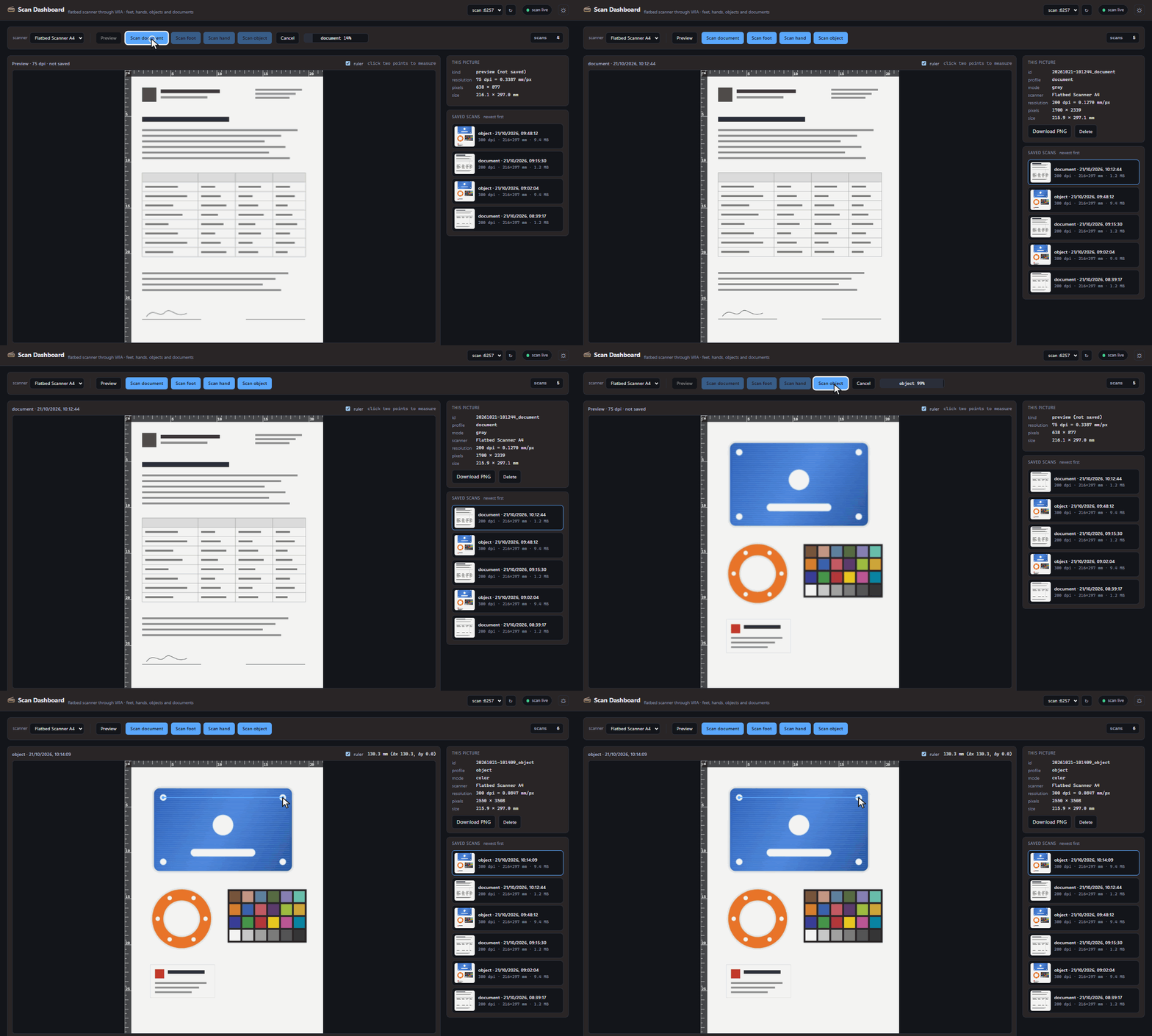
BlinkPose.Scan dashboard: a form is scanned in grey and opens in the list; then an object scan runs - a blue anodized plate, an orange gasket and a colour card on the glass - and the finished 300 dpi scan opens with millimetre rulers and the plate's hole spacing measured

Scan dashboard — two jobs in a row. A form is scanned in grey and lands at the top of the list; then the parts go on the glass, the colour preview shows them while the 300 dpi scan runs, and on the saved scan two clicks measure the plate's hole spacing in millimetres.

What it does

The scanner, wherever you are

The scanner sits on one PC. Scans can be started, seen and measured from any other, by a person or by your software.

Any common flatbed

It works through the scanner interface built into Windows, so the scanner's own driver is all it needs. No vendor dialog pops up.

Profiles

Each kind of scan is a named profile with its own resolution, colour mode and brightness: document, object, foot, hand, or any you add.

Documents and objects

Forms in grey at 200 dpi; parts, samples and flat objects in colour at 300 dpi, sharp to the edges.

True to size

Every scan records the resolution the scanner really used, and a per-scanner calibration corrects a scanner that is a percent off. The PNG prints at 1:1 and every pixel has a size in millimetres.

Measure in the browser

Millimetre rulers along the edges, and two clicks give a distance: a hole spacing, an outline, a length.

Data feed

Scan progress and each finished scan go out as JSON over TCP and Server-Sent Events, like every other module. Your software starts a scan with one request and fetches the picture.

Inside the dashboard

Preview, scan, measure

One page for the whole job, from placing the object to the saved scan.

Why it's different

A picture with a size

An ordinary scan is just a picture. BlinkPose.Scan keeps what makes it a measurement: the resolution the scanner really used, written into the PNG and next to it, so the scan can be measured on, printed to size, or handed to your software in millimetres.

0.08 mm
a pixel at 300 dpi
1:1
printed to size
4
profiles, add your own
LAN
from any browser